Managing employees becomes more complicated as a business grows. What begins with a simple spreadsheet for employee details can gradually turn into separate files for attendance, leave, salary calculations, payslips and employee documents.
At first, these manual processes may seem manageable. Over time, HR teams and business owners can spend increasing amounts of time updating records, correcting errors, following up on approvals and preparing payroll information.
This is where Human Resource Management System (HRMS) software can help.
An HRMS centralises employee information and automates selected HR processes, allowing businesses to manage routine activities through a structured system.
But with multiple HRMS platforms available in India, how do you choose the right one?
The best HRMS for a small business is the one that fits its workforce, simplifies everyday HR operations, meets its payroll and attendance requirements, protects employee information and remains affordable as the business grows.
This guide explains what to look for before investing in HRMS software in 2026.
1. Start by Identifying Your HR Problems
Before comparing software providers, identify the processes that consume the most time in your business.
Different businesses have different requirements. A company with 15 office employees may need straightforward leave and attendance management, while a manufacturer with 80 shift-based employees may require face recognition, worksite controls and detailed attendance reports.
Start by answering these questions:
- Are employee records scattered across spreadsheets and documents?
- Does HR calculate attendance manually?
- Are employees requesting leave through WhatsApp, email or verbal communication?
- Does payroll preparation require repeated data entry?
- Do managers struggle to approve requests on time?
- Is attendance difficult to monitor across multiple locations?
- Do employees frequently ask HR for payslips or leave balances?
- Are management reports difficult to prepare?
Write down your three biggest HR problems before evaluating vendors.
This simple exercise helps you prioritise features that solve actual operational problems instead of paying for features you may never use.
2. Check These 10 Essential HRMS Features
Not every business needs every available HR feature. However, the following capabilities are worth evaluating when choosing HRMS software.
| Feature | Why Your Business Needs It |
|---|---|
| Employee management | Maintains employee profiles, employment details and organisational information in one place. |
| Attendance management | Records check-ins, check-outs, working hours and attendance exceptions. |
| Leave management | Helps employees request leave and managers approve or reject requests. |
| Payroll management | Supports salary structures, deductions, payroll processing and payslips. |
| Employee self-service | Allows employees to access permitted information and submit routine requests. |
| Shift management | Helps businesses manage different shifts, schedules and attendance policies. |
| Reports and analytics | Provides visibility into attendance, employee records and other HR information. |
| Roles and permissions | Controls which employees and managers can access or modify particular information. |
| Document management | Helps organise employee documents and related records. |
| Audit logs | Helps authorised administrators review selected system activities and changes. |
Which Features Should You Prioritise First?
For most small businesses, begin with employee management, attendance, leave and the HR processes that affect payroll.
Add shift scheduling, GPS geofencing, face recognition, multi-company management or advanced reporting when your operating model requires them.
The objective is to select a system that solves your immediate problems without making daily administration unnecessarily complicated.
3. Evaluate Payroll Features Carefully
Payroll is one of the most important areas to examine when choosing HRMS software in India.
Salary calculations may involve basic salary, allowances, deductions, payable days, approved leave, loans, advances and other company-specific policies.
Depending on the organisation, payroll may also involve applicable statutory requirements such as Provident Fund (PF), Employees' State Insurance (ESI), Professional Tax (PT) and Tax Deducted at Source (TDS).
Before selecting a platform, verify the following:
- Can you configure your salary structure?
- Can the system process attendance-related salary calculations?
- Can authorised users review payroll before finalisation?
- Does it support applicable deductions and statutory calculations?
- Can employees access their payslips?
- Can payslips be downloaded as PDFs?
- Can payroll data be exported for accounting or other systems?
- Are payroll reports available for reconciliation?
- How are corrections and changes to salary records handled?
Important: Do not assume that every HRMS automatically handles every statutory obligation. Confirm which calculations, reports, filings and updates are supported, and which responsibilities remain with your payroll or finance team.
4. Choose the Right Attendance Method
Attendance requirements vary considerably between workplaces.
A business should choose an attendance method based on employee work patterns, verification requirements, workplace conditions and available devices.
| Attendance Method | Suitable Use Case | Important Consideration |
|---|---|---|
| Manual attendance | Very small teams with limited complexity | Requires consistent recordkeeping and review. |
| Mobile attendance | Employees who need to record attendance using supported mobile devices | Device access and location requirements should be evaluated. |
| GPS geofencing | Employees who must check in at approved worksites | GPS accuracy and location validation can vary. |
| Face recognition | Workplaces that need identity verification through a supported camera or kiosk | Recognition accuracy, lighting, anti-spoofing and privacy require attention. |
| Fingerprint biometric | Fixed workplaces using fingerprint readers | Hardware, maintenance and device availability matter. |
| Integrated attendance system | Businesses needing attendance connected with leave and payroll | Verify the supported devices, workflows and integrations. |
For example, an office with a fixed workforce may prefer a kiosk or biometric device. A business with field employees may need location-based attendance. A factory with multiple shifts may require a combination of attendance devices and shift management.
Before purchasing, test the complete attendance process under real working conditions.
5. Look for Integrated Leave and Employee Self-Service
HR teams often spend a significant amount of time answering routine questions:
- How many leaves do I have remaining?
- Has my leave request been approved?
- Where can I download my payslip?
- Why is my attendance marked incorrectly?
- How can I request an attendance correction?
An HRMS with employee self-service can allow staff to access permitted information and submit requests without depending on HR for every routine task.
Leave management should support the policies your organisation actually uses, including applicable leave types, approval workflows, leave balances and holiday calendars.
Before choosing a platform, confirm that managers can review requests, employees can track their status and authorised administrators can correct records when necessary.
A well-configured process reduces unnecessary follow-ups and makes HR operations more predictable.
6. Compare HRMS Pricing and the Total Cost
HRMS pricing can vary according to employee count, subscription model, feature availability, hardware requirements and support arrangements.
Some providers charge per employee, while others offer fixed monthly plans with employee limits. Enterprise deployments may require customised pricing.
Do not compare products based only on the advertised starting price.
Consider the following cost components:
| Cost Component | Questions to Ask |
|---|---|
| Subscription | Is billing monthly or annual? |
| Employee limits | What happens when the workforce exceeds the included limit? |
| Features | Are payroll, attendance and reports included in the selected plan? |
| Hardware | Are biometric readers, tablets or other devices required? |
| Implementation | Are setup, configuration or data migration charges applicable? |
| Integrations | Are accounting, payroll or third-party integrations included? |
| Support | What technical support is included in the subscription? |
| Taxes | Is GST included in the quoted price? |
| Data export | Can the business retrieve its records if it changes providers? |
| Renewal | Can pricing or contract terms change at renewal? |
Example: Calculate the Actual Cost
Suppose a business receives a quotation for HRMS software at ₹2,000 per month.
The subscription alone would cost ₹24,000 over 12 months, before applicable taxes and any additional charges.
If the business also needs hardware, paid setup, migration or additional modules, the total cost will be higher.
Use this formula when comparing providers:
Total first-year cost = Subscription fees + Setup and migration + Hardware + Additional services + Applicable taxes
Also compare the time your team spends maintaining the system. A cheaper product may not be the best value if it requires substantial manual work to complete everyday tasks.
7. Check Whether the HRMS Can Scale With Your Business
Your requirements today may be different from your requirements next year.
A business with 15 employees may eventually grow to 50, 100 or more. During that growth, HR processes often become more complex.
Choose a platform that can accommodate the changes relevant to your business.
Look for:
- Flexible employee limits or a clear upgrade path
- Multiple departments and designations
- Manager and reporting hierarchies
- Different shifts and attendance policies
- Additional worksites or branches
- Role-based permissions
- Payroll and reporting capabilities that match your growth
- Reliable data export and migration options
If your business operates multiple legal entities, ask whether the platform supports separate company records, permissions and payroll configurations where required.
Scalability does not mean purchasing the largest plan immediately. It means avoiding a platform that becomes unsuitable as soon as your business grows.
8. Review Data Security and Privacy
HRMS software stores employee information that may include contact details, employment records, salary information, documents and attendance history.
Some systems may also process facial information or location data.
Security should therefore be part of your selection process, not an afterthought.
Ask potential vendors:
- Where is employee information stored?
- Is data encrypted during transmission and, where appropriate, at rest?
- Can administrators control access through roles and permissions?
- Are important administrative activities recorded in audit logs?
- How are backups and recovery handled?
- What happens when an employee leaves the organisation?
- Can the business export its information if it changes providers?
- What retention and deletion controls are available?
- How does the vendor handle security incidents?
- What privacy commitments and contractual protections apply?
For facial recognition and other sensitive employee information, assess the necessity of collection, employee notices, access restrictions, retention periods and applicable Indian data-protection obligations.
Avoid selecting a provider solely because it advertises AI or advanced security. Ask for clear explanations of the actual controls and limitations.
9. Test the User Experience Before Purchasing
A feature-rich HRMS can still create problems if employees and managers find it difficult to use.
Before committing, test the workflows that your team will use every day.
For administrators:
- Adding an employee
- Importing employee information
- Configuring departments and designations
- Setting up attendance and shifts
- Creating salary structures
- Processing leave requests
- Reviewing reports
For employees:
- Checking in and checking out
- Viewing attendance history
- Applying for leave
- Checking leave balances
- Downloading payslips
- Updating permitted profile information
For managers:
- Reviewing team attendance
- Approving leave
- Handling attendance corrections
- Accessing authorised reports
Test the software using realistic scenarios rather than relying on a feature presentation.
If employees regularly use mobile devices, evaluate the mobile experience. If HR works primarily on a desktop, test the administrative interface as well.
A simple and reliable workflow is often more valuable than a long feature list.
10. Decide Between Cloud HRMS and Self-Hosted HRMS
The deployment model can influence cost, maintenance, access and responsibility.
| Consideration | Cloud HRMS | Self-Hosted HRMS |
|---|---|---|
| Hosting | Managed by the provider, depending on the service | Hosted on infrastructure controlled by the organisation or its hosting provider |
| Initial setup | Often simpler | May require infrastructure and deployment work |
| Maintenance | Provider generally manages the platform infrastructure | The organisation or its service provider handles more infrastructure responsibilities |
| Customisation | Depends on the product and plan | Depends on the software licence and technical architecture |
| Data control | Depends on provider terms, architecture and available controls | Greater infrastructure control, but responsibility for security remains with the organisation |
| Ongoing costs | Subscription and optional services | Hosting, maintenance, support and licensing costs may apply |
Neither model is automatically better for every business.
A cloud HRMS may be convenient for businesses that want less infrastructure management. A self-hosted solution may suit organisations that need more control over deployment or have specific technical requirements.
Compare the complete operational responsibilities, not just the hosting cost.
11. Common Mistakes to Avoid When Choosing HRMS Software
Businesses can make expensive decisions when they focus on the wrong criteria.
Choosing Only by Price
The cheapest subscription may not include the attendance method, payroll functions or reports your business requires.
Buying Unnecessary Features
Advanced modules may be valuable later, but purchasing them before they are needed can increase cost and complexity.
Ignoring Employee Adoption
If employees and managers cannot easily use the system, the organisation may continue relying on spreadsheets and informal communication.
Assuming All Payroll Features Are Included
Confirm statutory calculations, reporting, exports and other payroll requirements before signing a contract.
Skipping the Trial
A trial or structured evaluation helps reveal practical issues that may not appear in a sales presentation.
Ignoring Data Portability
Check whether your organisation can export its records in usable formats and understand the process for leaving the provider.
Overlooking Implementation and Support
Clarify who configures the system, migrates data, trains administrators and handles technical problems.
12. A Practical HRMS Evaluation Scorecard
Use this scorecard to compare shortlisted providers. Assign a score from 1 to 5 for each criterion, where 1 means poor and 5 means excellent.
| Evaluation Criterion | Suggested Weight |
|---|---|
| Essential HR features | 20% |
| Attendance and payroll suitability | 20% |
| Ease of use | 15% |
| Total cost of ownership | 15% |
| Security and privacy | 10% |
| Reports and integrations | 10% |
| Support and scalability | 10% |
| Total | 100% |
To calculate the weighted score, multiply each criterion's score out of 5 by its weight, then add the results.
For example, a score of 4 out of 5 on a criterion weighted at 20% contributes 16 percentage points to the final score.
Use the same criteria for every provider so you can compare products consistently. Treat security, legal compliance and essential business requirements as mandatory checks rather than allowing a high overall score to compensate for a critical weakness.
How BizlumoAI Supports Small Business HR Operations
BizlumoAI is an HRMS designed for Indian small and medium-sized businesses that want to manage everyday HR operations through a centralised platform.
Its published feature set includes:
- Employee management and records
- Attendance management with face recognition
- GPS geofencing and worksite management
- Leave management and approvals
- Payroll and payslips
- Expense claims and approvals
- Role-based access and activity logs
- Employee self-service
- Reports and data exports
- Multi-company organisation management
The platform is designed to bring attendance and other core HR workflows together, reducing the need to maintain disconnected records across different tools.
BizlumoAI also advertises a free plan for up to 10 employees. Businesses should review the current pricing page to confirm employee limits, included features, applicable taxes and plan conditions before choosing a subscription.
Explore the platform:
The right choice depends on your business requirements. Compare the available features with the evaluation checklist above and test the workflows that matter most to your team.
Frequently Asked Questions
1. Which HRMS Software Is Best for a Small Business in India?
The best HRMS depends on employee count, attendance requirements, payroll complexity, budget, security needs and ease of use. Compare multiple providers against the same requirements and test the complete workflow before making a decision.
2. What Features Should a Small Business Look for in HRMS Software?
Start with employee management, attendance, leave, payroll, employee self-service and reporting. Add shift management, GPS geofencing, face recognition, multi-company management or integrations when they are relevant to your operations.
3. Is HRMS Software Suitable for Businesses With Fewer Than 10 Employees?
Yes. Small businesses can benefit from organised employee records and simpler attendance and leave processes. However, the value depends on the complexity of your operations, the cost of the system and the time saved.
4. Can HRMS Software Automate Payroll in India?
Many HRMS platforms support payroll calculations, salary structures, deductions and payslip generation. The exact statutory calculations, reports and filing support vary by provider and plan. Verify the capabilities required by your business before purchasing.
5. How Much Does HRMS Software Cost in India?
Pricing varies according to employee count, subscription model, included modules, hardware, implementation and support. Compare the full first-year cost and renewal terms rather than relying solely on the advertised starting price.
6. Can HRMS Software Manage Attendance Across Multiple Branches?
Some platforms support multiple worksites, branches or companies. Confirm whether the selected product can manage your required locations, permissions, shifts and reporting structure.
7. Is Cloud HRMS Better Than Self-Hosted HRMS?
Neither is universally better. Cloud HRMS may reduce infrastructure management, while self-hosted HRMS may offer greater control over deployment. The right option depends on your technical resources, security requirements, budget and operational preferences.
8. How Long Does HRMS Implementation Take?
Implementation time depends on the employee count, data quality, payroll complexity, attendance configuration, integrations and training requirements. Ask the vendor for a realistic implementation plan and identify who is responsible for each task.
9. Can a Business Switch HRMS Providers Later?
Switching is possible, but the effort depends on data export options, available formats, historical records, integrations and contractual terms. Confirm data portability and exit procedures before committing to a provider.
10. Does HRMS Software Eliminate the Need for an HR Team?
No. HRMS can automate repetitive administrative work and improve recordkeeping, but people are still needed for employee relations, policy decisions, exception handling, compliance oversight and other responsibilities.
Final Thoughts
Choosing HRMS software is an operational decision, not simply a software purchase.
The right platform should address your current HR challenges, simplify daily workflows, support accurate payroll preparation, protect employee information and remain practical as your business grows.
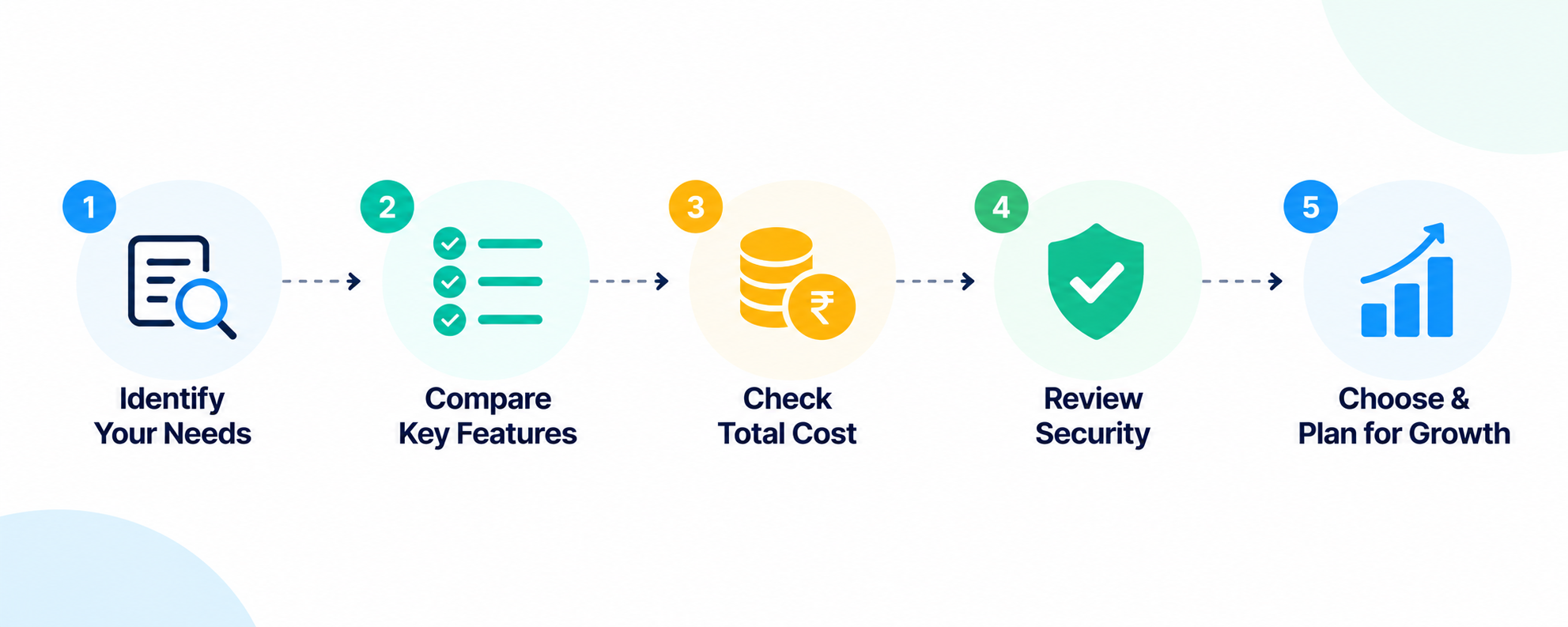
Start with your requirements. Compare features and total costs. Test the user experience. Review security and data portability. Then select the platform that provides the best fit for your organisation.
The goal is not to buy the HRMS with the most features. It is to build a more organised, efficient and reliable HR operation.