What Is Face Recognition Attendance Software?
Face recognition attendance software is a system that uses facial recognition technology to help verify an employee’s identity when they check in or check out of work.
Instead of relying only on attendance registers, ID cards or fingerprint scanners, employees can verify their identity using a supported camera, kiosk or mobile device.
Modern systems may combine facial recognition with attendance timestamps, GPS geofencing, shift management, leave records and payroll processing.
For Indian businesses, this can be particularly useful when managing employees across offices, factories, retail locations, construction sites or multiple branches.
In simple terms: face recognition helps verify who is marking attendance, while GPS geofencing can help verify where the check-in takes place.
The right software combines these checks with attendance rules and reporting so HR teams spend less time correcting records manually.
How Does an AI Face Recognition Attendance System Work?
A typical system follows a straightforward process.
- Employee registration: An authorised administrator registers the employee and completes the system’s identity-enrolment process.
- Face verification: The employee presents their face to a supported camera or device.
- Identity matching: The system compares the captured face with the enrolled reference according to its recognition process.
- Attendance recording: If the verification requirements are satisfied, the system records the check-in or check-out with a timestamp.
- Attendance processing: The record is processed according to configured shifts, work hours, late-arrival rules and other attendance policies.
- Reporting and payroll: Approved attendance data can be used for reports and payroll calculations, depending on the software’s capabilities and configuration.
Some systems also use anti-spoofing or liveness-detection measures designed to make it harder to fool the system with a photograph or video. The effectiveness of these safeguards varies by implementation, so businesses should test them before choosing a provider.
What Happens When the Internet Is Unavailable?
Offline attendance is an important consideration for factories, basements, remote sites and locations with unreliable connectivity.
Some systems can capture attendance locally and synchronise records when the connection returns. However, offline capabilities vary. Before purchasing, confirm whether face verification itself works offline, what data is stored locally, and how conflicts or failed synchronisation are handled.
Key Features to Look for in Face Recognition Attendance Software
Not every attendance system offers the same capabilities. A business should evaluate the complete attendance workflow rather than selecting software based on facial recognition alone.
| Feature | Why It Matters |
|---|---|
| AI face recognition | Helps verify employee identity during attendance marking. |
| Anti-spoofing protection | Adds safeguards against attempts to use photos or videos. |
| GPS geofencing | Restricts eligible check-ins to configured worksite boundaries. |
| Offline attendance | Supports attendance capture where internet connectivity is unreliable, subject to system limitations. |
| Check-in and check-out tracking | Maintains records of employee working time. |
| Shift management | Applies the correct shift schedule and attendance rules. |
| Leave integration | Helps reconcile approved leave with attendance records. |
| Payroll integration | Reduces duplicate data entry when attendance feeds into payroll. |
| Employee self-service | Allows employees to review attendance and submit requests. |
| Attendance reports | Helps HR review absences, late arrivals, work hours and discrepancies. |
| Multiple worksite support | Helps organisations manage attendance across locations. |
| Access controls and audit logs | Helps restrict sensitive data access and track administrative changes. |
Buying tip: Ask the vendor to demonstrate the complete process—from employee verification to the final attendance report—not just the face-scanning screen.
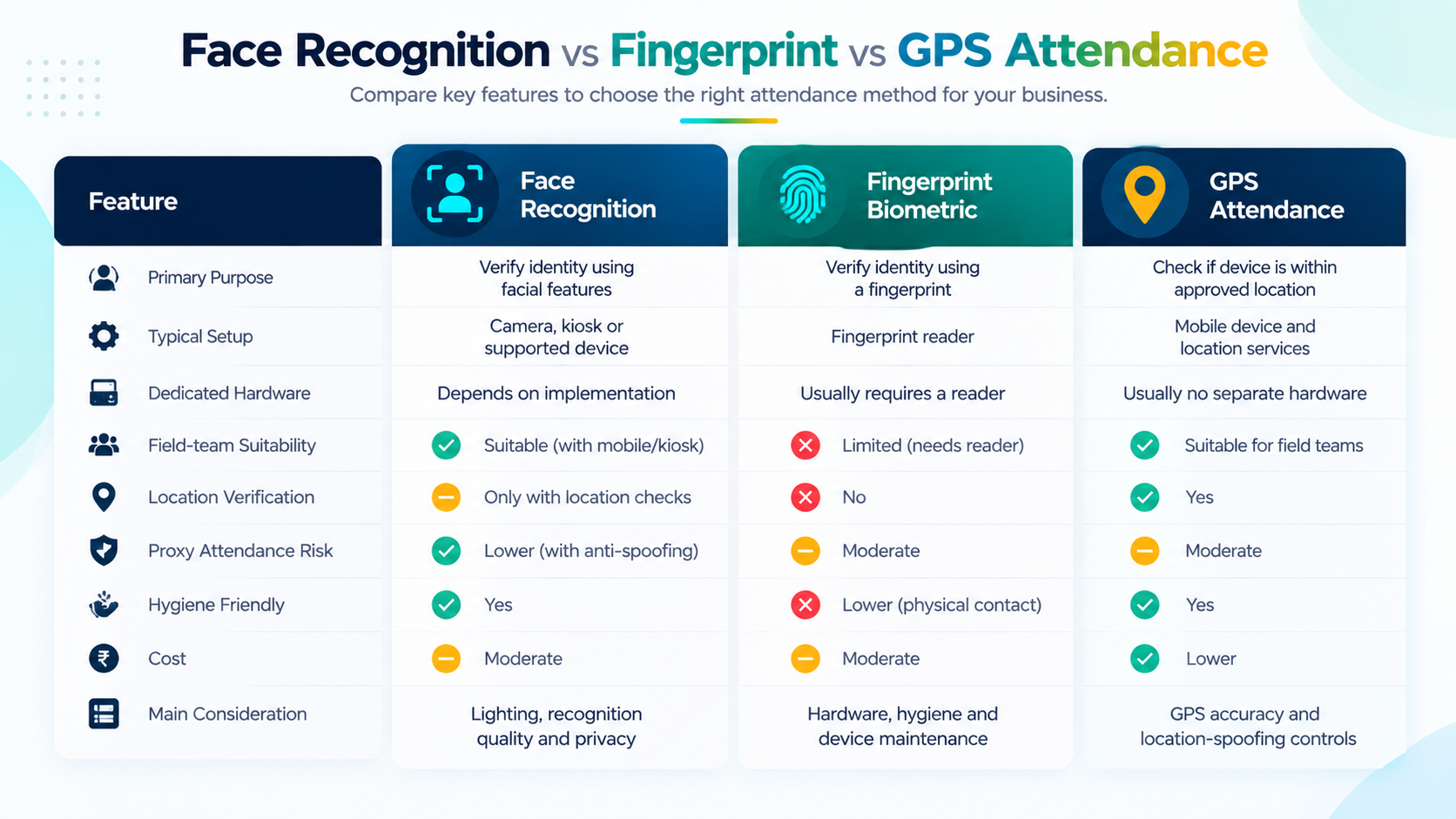
Face Recognition vs Fingerprint vs GPS Attendance
These methods solve different problems. Some businesses need one method, while others benefit from combining two or more.
| Capability | Face Recognition | Fingerprint Biometric | GPS Geofencing |
|---|---|---|---|
| Primary purpose | Verify identity using facial features | Verify identity using a fingerprint | Check whether a device is within an approved location |
| Typical setup | Camera, kiosk or supported device | Fingerprint reader | Compatible mobile device and location services |
| Dedicated hardware | Depends on implementation | Usually requires a reader | Usually no separate attendance reader |
| Field-team suitability | Depends on mobile or kiosk support | Limited when employees are away from the reader | Useful for eligible mobile check-ins |
| Location verification | Only if combined with location checks | Not inherently provided | Yes, subject to location accuracy and validation |
| Main consideration | Lighting, recognition quality and privacy | Hardware, hygiene and device maintenance | GPS accuracy and location-spoofing controls |
Which Method Is Best for Your Business?
- Office-based teams: A face-recognition kiosk or biometric device may be appropriate when employees report to a fixed workplace.
- Field employees: GPS geofencing can help verify that attendance is marked at an approved location.
- Factories and warehouses: A fixed kiosk or biometric device may suit controlled entry points and shift-based work.
- Multi-location organisations: A centralised attendance system can help manage employees and worksites across different branches.
- Businesses with mixed workforces: A combination of face recognition, mobile attendance and location verification may be more practical than relying on one method.
The best option depends on where employees work, the level of verification required, the available devices and the organisation’s privacy policies.
Benefits of Face Recognition Attendance Software for Indian Businesses
1. Reduces Manual Attendance Work
Manual attendance often involves collecting records, checking discrepancies, correcting spreadsheets and preparing reports.
An automated system can reduce repetitive work by capturing attendance digitally and applying configured rules.
2. Helps Discourage Proxy Attendance
Proxy attendance occurs when one employee records attendance on behalf of another.
Facial verification and suitable anti-spoofing controls can make this more difficult. Businesses should still evaluate recognition accuracy, exception handling and the system’s ability to detect attempted misuse.
3. Makes Attendance Records Easier to Review
HR teams can use digital records to review attendance, late arrivals, absences and working hours without relying entirely on paper registers or scattered spreadsheets.
4. Supports Payroll Preparation
Attendance affects payable days, leave deductions and, where applicable, overtime or other attendance-related calculations.
When attendance and payroll are integrated, businesses can reduce duplicate entry and make it easier to identify discrepancies before payroll is finalised.
Automated records do not eliminate the need to review exceptions or validate payroll rules.
5. Improves Multi-Location Visibility
Businesses operating across branches or worksites may struggle to collect attendance data consistently.
A centralised system can give authorised managers a consolidated view, subject to role permissions and the product’s multi-location capabilities.
6. Helps Employees Access Their Own Records
Employee self-service can allow staff to review attendance, check leave balances and submit correction requests without repeatedly contacting HR.
This can make routine attendance queries easier to manage.
How Much Does Face Recognition Attendance Software Cost in India?
There is no single standard price for face recognition attendance software. The total cost depends on the number of employees, the verification method, the devices required and the wider HR features included.
Some providers charge a monthly subscription, while others use per-employee pricing, annual contracts, hardware charges or custom enterprise quotations.
| Cost Factor | What to Check |
|---|---|
| Software subscription | Monthly or annual fee and included employee limit |
| Employee count | Whether the price changes as the workforce grows |
| Hardware | Whether a kiosk, tablet, camera or biometric device must be purchased |
| GPS and geofencing | Whether location verification is included in the selected plan |
| Payroll integration | Whether payroll is built in or requires another product |
| Setup and migration | Charges for employee registration, data imports and configuration |
| Multiple locations | Whether additional worksites or companies cost extra |
| Support | What level of technical support is included |
| GST | Whether the quoted price includes or excludes applicable taxes |
Should You Choose Standalone Attendance Software or a Complete HRMS?
A standalone attendance tool may be sufficient if your main requirement is recording employee check-ins.
A complete HRMS may be more suitable if you also need leave management, employee records, payroll, payslips, expense claims and reporting.
Compare the total cost of the workflow, not only the attendance subscription. Separate products may create additional administrative work when HR has to transfer information between systems.
Before committing to a long-term plan, request a demonstration and confirm the current price, employee limits, supported devices and any additional charges.
Face Recognition Attendance for Small and Medium Businesses
Small businesses do not necessarily need an enterprise-scale attendance system. They need one that fits their actual workforce and can grow with them.
For a company with 10–25 employees, the priority may be straightforward attendance tracking, leave management and basic reporting.
For a business with 50–100 employees, additional requirements may include shift rules, multiple departments, payroll integration, manager approvals and better visibility across locations.
For a growing organisation with multiple branches, centralised administration and clear access controls become more important.
A useful starting point is to answer these questions:
- How many employees need attendance tracking?
- Do employees work from one office or several locations?
- Do they need a fixed kiosk, mobile check-in or both?
- Is face verification required, or is GPS attendance sufficient?
- Does attendance need to feed into payroll?
- Who can approve attendance corrections?
- What reports does HR need each month?
- How will employee facial data be protected?
These answers will help narrow down the right system without paying for features your business does not need.
What Should You Check Before Buying?
Use this checklist when evaluating vendors.
- [ ] Test face recognition with employees under normal workplace lighting.
- [ ] Ask how the system handles failed or uncertain matches.
- [ ] Test anti-spoofing measures rather than relying on marketing claims.
- [ ] Confirm whether offline capture and synchronisation are supported.
- [ ] Verify whether GPS geofencing is included and how location is validated.
- [ ] Check shift, leave, late-arrival and attendance-correction rules.
- [ ] Confirm whether attendance connects directly to payroll.
- [ ] Review mobile and kiosk compatibility.
- [ ] Check the availability of attendance reports and data exports.
- [ ] Understand how biometric information is stored, protected, retained and deleted.
- [ ] Review administrator permissions and audit logs.
- [ ] Confirm the full cost, employee limits, GST and support arrangements.
Do Not Ignore Privacy and Data Security
Facial information is sensitive personal information in practical terms, even where its precise legal classification depends on the applicable law.
Before deployment, businesses should establish a clear purpose for collecting facial data, provide appropriate notices, restrict access, protect stored information and define retention and deletion practices.
They should also review applicable Indian privacy and data-protection requirements, including relevant obligations under the Digital Personal Data Protection Act and rules in force at the time of deployment. Obtain appropriate legal advice where needed.
A good attendance system should support responsible administration rather than treating biometric collection as a purely technical decision.
How BizlumoAI Helps Businesses Manage Attendance
BizlumoAI is an HRMS designed for Indian small and medium-sized businesses that need attendance and core HR operations in one system.
Its published feature set includes face-recognition attendance through a kiosk on a compatible Android phone or tablet, anti-spoofing measures, offline operation with synchronisation when connectivity returns, and GPS geofencing for configured worksites.
The platform also brings attendance into a wider HR workflow that includes:
- Employee records and management
- Attendance and worksite management
- Leave requests and approvals
- Payroll and payslips
- Employee self-service
- Reports and exports
- Multi-company organisation management
For businesses that want to move away from disconnected registers and spreadsheets, this integrated approach can reduce the need to manage attendance and related HR information across separate tools.
Before selecting any platform, confirm that its current plan, employee limits, device requirements and attendance configuration fit your organisation.
Explore the product at BizlumoAI or review the available plans at BizlumoAI Pricing.
Frequently Asked Questions
1. What Is the Best Face Recognition Attendance Software in India?
The best option depends on your team size, work locations, budget, required verification methods and payroll needs. Compare recognition performance, anti-spoofing, offline support, GPS, reports and data-protection practices before choosing a provider.
2. Can Face Recognition Attendance Software Prevent Proxy Attendance?
It can help reduce proxy attendance by verifying the employee’s face and, where supported, using anti-spoofing controls. No system should be assumed to eliminate every form of attendance fraud. Test its capabilities and exception-handling process before deployment.
3. Does Face Recognition Attendance Require a Biometric Machine?
Not always. Some systems use compatible Android phones, tablets, mobile applications or kiosks. Others rely on dedicated devices. Confirm the hardware and software requirements for your chosen solution.
4. Can Face Recognition Attendance Work Without the Internet?
Some systems support offline attendance capture and synchronise records when connectivity returns. Offline capabilities differ, so confirm whether identity verification, record storage and synchronisation all work as required in your intended environment.
5. Can Face Recognition Attendance Connect with Payroll?
Yes, some HRMS platforms integrate attendance with payroll. The system can use processed attendance data for relevant salary calculations, but configured policies and exceptions should be reviewed before payroll is finalised.
6. Is Face Recognition Attendance Suitable for Field Employees?
It can be suitable when the system supports mobile face verification and the required location controls. GPS geofencing can add a location check, but businesses should test device compatibility, GPS accuracy and offline behaviour in the places where employees work.
7. Is Face Recognition Attendance Software Expensive?
Costs vary by employee count, software plan, hardware, setup, support and integrations. Compare the full recurring and one-time cost rather than judging a product solely by its advertised starting price.
8. Is Face Recognition Attendance Safe for Employees?
Its safety depends on the implementation and the organisation’s data practices. Businesses should assess security controls, access restrictions, data retention, deletion processes, employee notices and applicable privacy obligations before collecting facial information.
Final Thoughts
Face recognition attendance software can help businesses move beyond manual registers and fragmented attendance records. Its value is greatest when identity verification, attendance rules, reporting and payroll work together in a reliable process.
The right solution is not necessarily the one with the most features. It is the one that fits your workforce, handles real workplace conditions, protects employee information and reduces unnecessary administrative work.
If your business is evaluating attendance software in